

- Thread Author
- #1
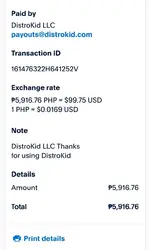
Method
1. Create Popular Playlist
2. Register a music on Distrokid
3. Add your Youtube Topic Music On The
Playlist
4. All Earnings from the Ad views will go to ur bank account
Example Music - Topic that Distrokid Uploaded
STEP 1 — Create Popular Playlist
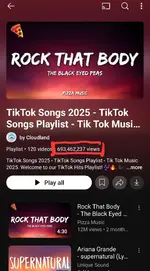
To create popular playlist, you need a niche, para mas madali, just create a playlist of music this upcoming September 2025 :
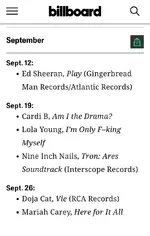
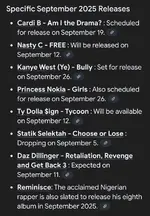
Then create a playlist based on their album, for example Minecraft Movie Soundtrack Album :
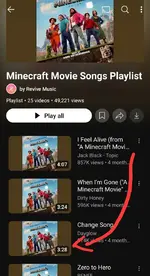
Now na meron ka ng Playlist, need mo ng sarili mong music, at isingit ang music mo dyan sa playlist, para magkaviews ang music mo.
Paano ngayon magkaroon ng sariling music at kumita? Follow Step 2.
STEP 2 — Register a music on Distrokid
Magdownload lang kayo ng Free AI music, sa suno or sa AI Music ǥëñeŕàtôŕ for Creators | Soundful
Generate lang kayo ng songs dyan, then after that, using an mp3 editor, ichange nyo ang tempo, at pitch, at icut nyo ang kalahati at ireverse nyo yung sound.
so, that way hindi na generic ang sound ng AI, at magiging original song.
Now, na meron ka ng music, it's time to upload it on Distrokid.
How to register on Distrokid 50% off?
Disclaimer : I will earn when you use my refferal link, in return you will get 50% Discount
Step 1 : Go to Temp Edu Mail
note : wag aalisin ang .pl sa dulo
Step 2 : Download "Brave Browser" Para gumana ang Virtual Card
Step 3 : Register on Distrokid using your generated Temp Mail to get 50% Discount (https://distrokid.com/vip/seven/10179453 and paste to Brave Browser)
"Just Distrokid My Location Sir"
Fill up necessary info and Choose What Plan you want :
You will get 50%, just pick "Musician", the first option for beginners, or pick multi artist if you have the budget.
For Basic Plan Prepare : $12.49
*use gotyme or gcash visa card or unionbank visa/mastercard (do not use amex card)
If GCash lang meron at walang card, credits kay officiallhee, follow this tutorial :
1. gawa ka uno digital bank gamit gcash (nasa save sa gcash yun)
2. after mo makagawa, lagyan mo pera gamit gcash (deposit ka from gcash to your uno gsave account)
3. then download mo "uno digital bank" tas link mo yung gsave uno account mo para magkaroon ka virtual card kay uno. (yun ginamit ko kay distrokid para sa payment ko.)
Kapag may Distrokid ka na, iupload mo lang yang original song mo sa Distrokid.
Step 3 — Add your Youtube Topic Music On The Playlist
Just simply add your own music na inupload mo sa distrokid papunta sa youtube playlist na ginawa mo at ilagay sa 2nd or 3rd place.
Just create a huge amount of playlist, with many many niches, not just music or movie soundtracks.
Step 4 — All Earnings from the Ad views will go to ur bank account
At the end month, lahat ng nagather mong ad views mula sa playlist, ay papasok sa Distrokid bank mo.
Last edited:


